One developer runs a real-time chess platform.
Without writing the plumbing.
WhitePawn gives people who own real chessboards one place to play, analyze, stream and
meet: games, puzzles, clubs, messages, calls and live play on the web, iOS and Android.
It is built by a single developer on sp00ky, with no API layer, no sync code and no
ops team. sp00ky also keeps every secret and shows the running system to the AI agents
that help build and operate it. Here is how.
79tables in one SurrealQL schema, shared by every platform
178live queries in the web app, none with a refetch
0hand-written API endpoints for reading or writing app data
16services deployed from a single sp00ky.yml
The challenge
WhitePawn began in 2022 as an app that connected one electronic board to one phone.
Its users wanted more: their Lichess and Chess.com games in one place, clubs,
messages, calls, puzzles and live play, on every device they own. A platform like
that normally needs a backend team.
The approach
Put everything into a schema and a config file. Tables and permissions in
SurrealQL, screens as live queries, writes straight to the local store, background
work as schedules and workflows, and the whole stack deployed with
spky deploy.
The result
In ten months, one developer took the web app from a first commit to a platform with
sixteen services, then brought the Flutter apps onto the same schema. September
2026 alone added a puzzle store, clubs, paid plans, AI connectors and live play.
web.whitepawn.app
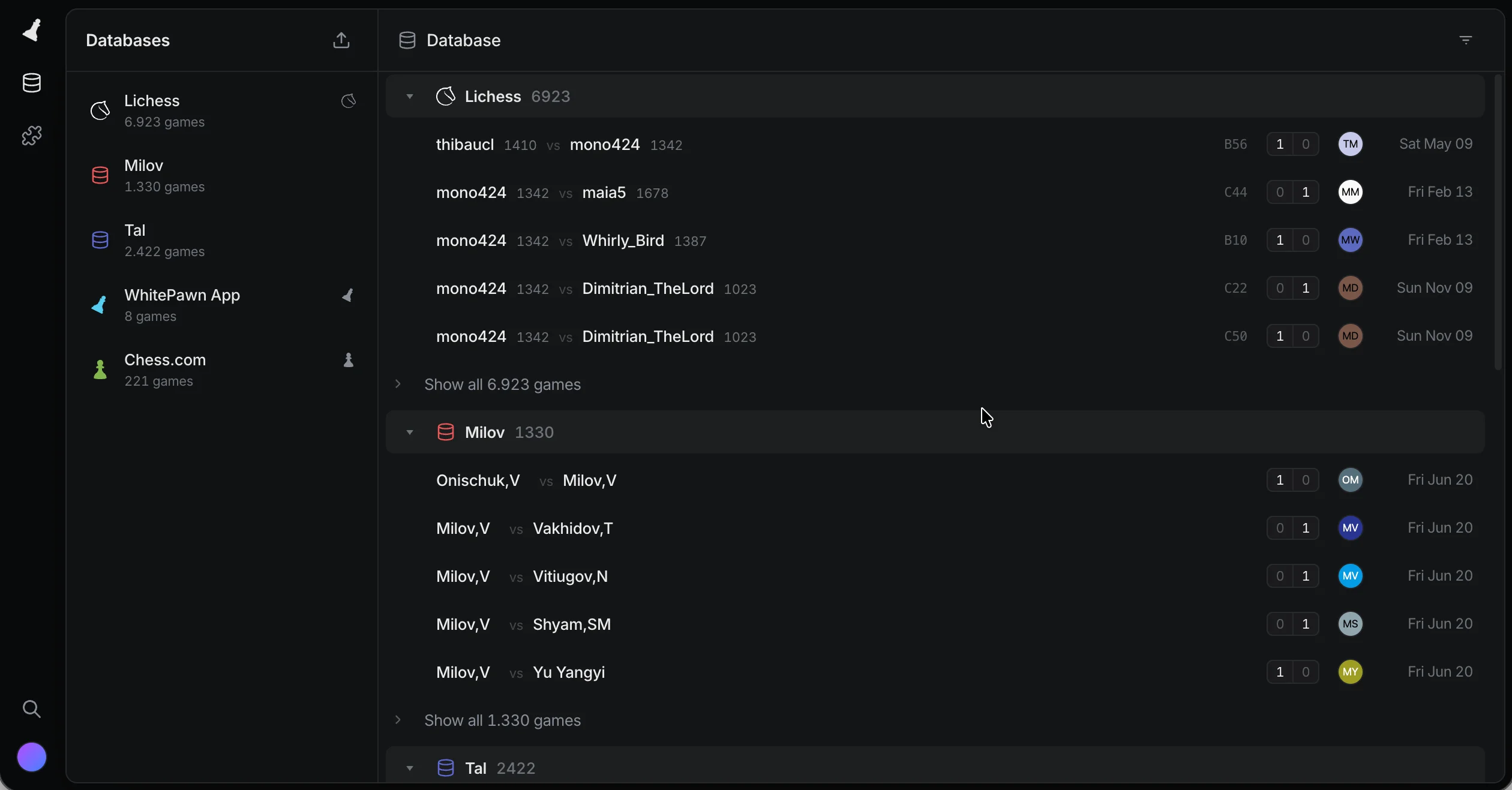
The games database. Nearly 11,000 games from Lichess, Chess.com and imported
collections, every list a live query. Import a PGN on your phone and it shows up here
without a reload.
What WhitePawn did not build
The backend a chess platform usually needs, and what replaced it.
Usually built by handWhat WhitePawn wrote instead
REST or GraphQL endpoints for every tableA DEFINE TABLE per table
Permission checks inside each handlerOne PERMISSIONS clause, also applied to live queries
TypeScript and Dart models kept in step by handTwo generated clients, 22,924 lines they never typed
A WebSocket server with reconnects and fan-outcreateQuery on the web, .watch() in Flutter
Client caching, refetching and invalidationNothing. Live queries do not go stale
An offline queue with retriesLocal-first writes and a sync badge from useSyncActivity
A cron server and job queue for game importsThe game-sync schedule, 17 lines of YAML
Orchestration for multi-step engine analysisThe game-cloud-analysis workflow
An upload service with signed URLsDEFINE BUCKET, useFileUpload, BucketImage
A signaling server for voice and video callsRows in the call table
Deploy pipelines, an autoscaler and backupsspky deploy and one sp00ky.yml
A secrets manager and an <code>.env</code> file per serviceOne shared vault, referenced by key name in each app
Runbooks, SSH sessions and log greps during incidentsThe admin dashboard, and an MCP server agents can read
How it is built
Seven steps, straight from the repository.
This is the path every WhitePawn feature takes, from table to production. The code is
taken from WhitePawn's source, trimmed where marked with ... and
reflowed to fit the page.
1
Describe the data once, with its rules
Every WhitePawn feature starts in one SurrealQL schema: 79 tables, each with its permissions next to its fields. Direct messages are a good example. Only the two people in a conversation can read a message, only the sender can write or delete it, and nobody can edit it.
Those same rules decide what each user's live queries return. There is no second copy of them in an API handler.
One config line per platform turns the schema into typed models for the web app and the Flutter app.
No REST or GraphQL layer, no permission checks repeated in handlers, no models kept in step by hand across TypeScript and Dart.
schema.surql…/schema/src/SurrealQL
DEFINE TABLE message SCHEMAFULL PERMISSIONS FOR select WHERE sender = $auth.id OR recipient = $auth.id FOR create WHERE sender = $auth.id AND recipient != $auth.id FOR update WHERE false FOR delete WHERE sender = $auth.id;DEFINE FIELD conversation ON message TYPE record<conversation>;DEFINE FIELD sender ON message TYPE record<user>;DEFINE FIELD recipient ON message TYPE record<user>;DEFINE FIELD text ON message TYPE string ASSERT string::len($value) > 0 AND string::len($value) <= 2000;
The inbox is one query builder and one hook. The conversation rows arrive with both participants already joined and already in order, from the local cache first and then live.
When a message lands on any device, the conversation's last_message_ms changes and the inbox re-sorts itself. The component has no idea a network exists.
The web app has 178 of these createQuery call sites. Not one of them is paired with a refetch.
No fetch calls, no cache keys, no invalidation after a write, no WebSocket client, no polling.
const conversations = createQuery(() => qConversations(db), { enabled: () => !!auth.userId(), deregisterOnCleanup: true,});// Already newest first: the order is part of the live query.return ( <For each={conversations.data()}> {(c) => <ConversationRow conversation={c} />} </For>);
3
Write once, let the database follow up
Sending a message is one write: create the message. It lands in the local store at once, so the bubble appears before any network round trip, and sp00ky sends it up in the background, retrying if the connection drops and holding it in an outbox while the device is offline.
Everything that follows from a new message is the database's job. A SurrealDB event on the message table updates the conversation: its preview, its place in the inbox and the sender's read state. It runs for every message, whether the web app, the Flutter app or an AI connector wrote it, and the inbox picks the change up through its live query.
The event checks that the sender really belongs to the conversation, and a message flushed late from an outbox never pushes the preview backwards.
No optimistic-update reducers, no rollback code, no offline queue, and no second write to keep in step across three clients.
dm.js…/src/lib/JavaScript
// One local write. On screen now, synced after.await db.create(draft.id, { conversation: toRecordId(convId), sender: toRecordId(myId), recipient: toRecordId(peerId), text, kind, created_ms: now,});
schema.surql…/schema/src/SurrealQL
-- Runs in the database for every new message,-- whichever client or agent wrote it.DEFINE EVENT bump_conversation ON TABLE message WHEN $event = "CREATE" THEN { LET $conv = (SELECT user_a, user_b, last_message_ms FROM ONLY $after.conversation); LET $members = [$conv.user_a, $conv.user_b]; IF $after.sender IN $members AND $after.recipient IN $members { ... IF $at >= ($conv.last_message_ms ?? 0) { UPDATE $after.conversation SET last_message_text = string::slice($after.text, 0, 120), last_message_ms = $at, last_message_sender = $after.sender; }; }; };
4
Use the same data on iOS and Android
The Flutter app reads the same tables through sp00ky's Dart client. The conversation query is a line-for-line twin of the web one, and the models are generated from the same schema.
Writes work the same way too: a typed create that shows up on the phone at once and on every other device a moment later.
No second API client, no hand-written JSON mapping, no drift between what the web and the phone think a row looks like.
Club crests, puzzle covers, broadcast art and stream recordings live in eight buckets, defined in the schema with their own permissions.
Uploading is a hook and rendering is a component. The row only stores a key.
No upload service, no signed-URL endpoint, no separate storage permissions to keep in line with the database.
club_covers.surql…/src/buckets/SurrealQL
-- Club logos, post images and event covers.-- Anyone may read; a signed-in user may write.DEFINE BUCKET club_covers BACKEND "file:/buckets/club_covers" PERMISSIONS WHERE $action IN ['get', 'head', 'exists'] OR ($auth != NONE AND $action IN ['put', 'delete']);
ClubSettingsDialog.jsx…/components/clubs/SolidJS
const upload = useFileUpload("club_covers");...// One key names both renditions: <key>_f.webp and <key>_t.webp.const key = coverKeyFor(club().id);const paths = coverPaths(key);for (const [path, blob] of [ [paths.full, full], [paths.thumb, thumb],]) { await upload.upload(path, blob); if (upload.error()) throw upload.error();}// The club row stores only the key.await updateClub(db, club().id, { cover_key: key });// ClubCrest.jsx renders the thumbnail from that key<BucketImage bucket="club_covers" path={coverThumbPath(club.cover_key)} alt=""/>
6
Describe background work instead of running it
WhitePawn imports every user's games from Lichess and Chess.com. That is one schedule: every minute, pick the connections that are due, call the sync backend once per connection, retry twice, and park a connection that keeps failing.
The "Sync now" button enqueues the same job from the client. Engine analysis runs as a two-step workflow the same way, analyze first and then compute insights.
The backend that does the importing is 1,138 lines of TypeScript. It does not schedule, queue or retry anything itself.
No cron server, no queue, no worker fleet, no retry bookkeeping, no dashboard to find stuck jobs.
sp00ky.ymlpackages/schema/YAML
schedules:
  game-sync:
    every: 1m
    backend: gamesync
    route: /syncGames
    forEach:
      query: >
        SELECT id FROM connection
        WHERE provider IN ['lichess', 'chesscom']
          AND sync_error = NONE
          AND (last_synced_at = NONE
            OR last_synced_at < time::now() - 15m)
          AND (sync_failed_at = NONE
            OR sync_failed_at < time::now() - 15m)
      key: id
    concurrency: skip
    retry: { max: 2, strategy: linear }
    quarantineAfter: 5
Each service keeps a small sp00ky.app.yml next to its code. The root config pulls them together: the web app, thirteen backends in Go, TypeScript and Rust, a LiveKit server, and a pool of render machines that scales from zero to five while a livestream is on air.
spky deploy builds the images, applies schema migrations and rolls the whole thing out to sp00ky cloud. Backups, logs and the admin dashboard come with it.
No Kubernetes, no Terraform, no deploy scripts per service, no autoscaler of their own.
DEFINE TABLE message SCHEMAFULL PERMISSIONS FOR select WHERE sender = $auth.id OR recipient = $auth.id FOR create WHERE sender = $auth.id AND recipient != $auth.id FOR update WHERE false FOR delete WHERE sender = $auth.id;DEFINE FIELD conversation ON message TYPE record<conversation>;DEFINE FIELD sender ON message TYPE record<user>;DEFINE FIELD recipient ON message TYPE record<user>;DEFINE FIELD text ON message TYPE string ASSERT string::len($value) > 0 AND string::len($value) <= 2000;
const conversations = createQuery(() => qConversations(db), { enabled: () => !!auth.userId(), deregisterOnCleanup: true,});// Already newest first: the order is part of the live query.return ( <For each={conversations.data()}> {(c) => <ConversationRow conversation={c} />} </For>);
dm.js…/src/lib/JavaScript
// One local write. On screen now, synced after.await db.create(draft.id, { conversation: toRecordId(convId), sender: toRecordId(myId), recipient: toRecordId(peerId), text, kind, created_ms: now,});
schema.surql…/schema/src/SurrealQL
-- Runs in the database for every new message,-- whichever client or agent wrote it.DEFINE EVENT bump_conversation ON TABLE message WHEN $event = "CREATE" THEN { LET $conv = (SELECT user_a, user_b, last_message_ms FROM ONLY $after.conversation); LET $members = [$conv.user_a, $conv.user_b]; IF $after.sender IN $members AND $after.recipient IN $members { ... IF $at >= ($conv.last_message_ms ?? 0) { UPDATE $after.conversation SET last_message_text = string::slice($after.text, 0, 120), last_message_ms = $at, last_message_sender = $after.sender; }; }; };
-- Club logos, post images and event covers.-- Anyone may read; a signed-in user may write.DEFINE BUCKET club_covers BACKEND "file:/buckets/club_covers" PERMISSIONS WHERE $action IN ['get', 'head', 'exists'] OR ($auth != NONE AND $action IN ['put', 'delete']);
ClubSettingsDialog.jsx…/components/clubs/SolidJS
const upload = useFileUpload("club_covers");...// One key names both renditions: <key>_f.webp and <key>_t.webp.const key = coverKeyFor(club().id);const paths = coverPaths(key);for (const [path, blob] of [ [paths.full, full], [paths.thumb, thumb],]) { await upload.upload(path, blob); if (upload.error()) throw upload.error();}// The club row stores only the key.await updateClub(db, club().id, { cover_key: key });// ClubCrest.jsx renders the thumbnail from that key<BucketImage bucket="club_covers" path={coverThumbPath(club.cover_key)} alt=""/>
sp00ky.ymlpackages/schema/YAML
schedules:
  game-sync:
    every: 1m
    backend: gamesync
    route: /syncGames
    forEach:
      query: >
        SELECT id FROM connection
        WHERE provider IN ['lichess', 'chesscom']
          AND sync_error = NONE
          AND (last_synced_at = NONE
            OR last_synced_at < time::now() - 15m)
          AND (sync_failed_at = NONE
            OR sync_failed_at < time::now() - 15m)
      key: id
    concurrency: skip
    retry: { max: 2, strategy: linear }
    quarantineAfter: 5
Alice works through a line on WhitePawn's analysis screen, one move on her laptop,
the next on her phone. Both read the same row in SurrealDB, and sp00ky runs behind the
database, working out which screens a change belongs on. The four steps under the
devices follow each move. Pull the plug on the phone's connection to see what a lost
connection does.
1Local writeThe device shows the move at once, from its local store.
2SurrealDBThe write is stored in the analysis_board row.
3sp00ky, behind itFinds the screens this row feeds, here the other device, and hands them back to SurrealDB.
4Live querySurrealDB pushes the row and the other device shows the move.
A re-enactment, slowed down so the round trip is visible. In production, a write takes
a median of 29 ms to pass through WhitePawn's whole sync engine.
Beyond sync
sp00ky became the hub, for people and for agents.
Once the schema, the services and the deploys lived in sp00ky, two more things moved
in: every secret the platform needs, and the AI agents that build and operate it.
Both now read from the same place, and that is what made WhitePawn AI native rather
than AI assisted.
40secrets in one shared vault, used by 11 of the 16 services
1encrypted value per secret and environment, however many services read it
605of 839 commits written together with AI agents; 355 of 370 since September
One vault, and no secret drifts
WhitePawn's services need Stripe, RevenueCat, LiveKit, Resend, Google sign-in and a
set of signing keys between them. None of those values is in the repository. Each
sp00ky.app.yml lists the names of the secrets it needs,
and spky deploy fills them in from the team's shared vault, server side.
There is exactly one encrypted copy of each value per environment. When four services
verify the same token signature, they read the same key. Rotating it is one
spky env set, and the next deploy hands the new value to every service
that names it. For every service sp00ky deploys, there is no second .env to
forget, no stale copy on a laptop, and no CI variable that quietly disagrees with
production.
Everyone who can decrypt holds their own passphrase, which never leaves their
machine. Removing someone deletes their copy of the vault key and revokes their API
keys, without re-encrypting a single secret.
sp00ky.app.yml
apps/commentator/YAML
env:
  - dev:
      PORT: "3674"
      ...
  - cloud:
      vault:
        # Shared with the relay, which uses it
        # to authenticate its session calls.
        - COMMENTATOR_SECRET
        - DASHSCOPE_API_KEY
Secrets several services share. One stored value each.
Secret
relay
email
game server
MCP
analysis
commentator
recorder
SPKY_JWT_PUBLIC_KEY
no
no
no
JWT_PRIVATE_KEY
no
no
no
no
no
CEC_ANALYSIS_*4 keys
no
no
no
no
no
COMMENTATOR_SECRET
no
no
no
no
no
RECORDER_SECRET
no
no
no
no
no
BCAST_RENDER_SECRET
no
no
no
no
no
Onboarding is three commands
WhitePawn has no onboarding document, and does not need one. There is no list of
forty variables to request, no password-manager folder to share, no afternoon spent
finding out which .env is current. The config file is the guide, and
the vault travels with the invite.
1
Invite
An admin
$ spky team invite dev@example.com
The admin's passphrase unlocks the vault key, and a re-encrypted copy travels with the invite. No value is sent to anyone.
2
Accept
The new developer
$ spky login
Sign in with GitHub, accept the invite and pick a personal passphrase. It never leaves the laptop.
3
Run
The new developer
$ spky dev
The whole stack starts from the dev values in each sp00ky.app.yml. Production secrets live in the cloud half of the config, so a laptop never holds one.
Agents onboard the same way. An MCP token is read-only unless you grant more, and
secret values stay masked unless the token carries secrets:reveal. You can
hand an agent the whole operating surface without handing it a single secret.
Run it locally, on production data
Some bugs only show up on real data: an account with years of imported games, or a
contact stacked from several player identities. WhitePawn reproduces them on the
laptop, on the real rows, in one of two ways.
Local code, production database. There is nothing to set up.
spky dev fills VITE_DB_ENDPOINT from the vault like any
other value, so the web app on localhost opens against the production database. It
still needs no production secret: the developer signs in with their own account, and
the schema's permissions decide what every live query returns, exactly as they do in
production. To see a bug report through someone else's eyes, an admin impersonates
that user from DevTools, and every session and every write is audited. Writes are
real too, so this mode is for looking and reproducing.
Production rows, local database. For work that rewrites data, like
a migration, a schema change or a bulk delete, WhitePawn copies an account into the
stack spky dev runs instead. One 141-line script reads the user row and
18 tables of games, databases, puzzles, analysis and comments, and inserts them
locally. Production is only ever read. The root password is fetched for that one
process by spky project credentials, so it is never written down, and
only someone already on the project can fetch it.
Rows keep their types because both ends speak the SDK's CBOR: a record link stays a
record link and a datetime stays a datetime, so the SCHEMAFULL tables accept every
row as it is. The password hash comes along with the user, so the production
password works on localhost. A re-run replaces only that account's rows.
const TABLES = [ ['player_name', 'author'], ['game_database', 'owner'], ['game', 'owner'], ... ['analysis', 'owner'], ['collection_share', 'user'], ['puzzle_rating', 'user'],];...for (const [table, field] of TABLES) { ... // Re-runs replace only this account's rows. await local .query(`DELETE FROM ${table} WHERE ${field} = $u`, { u: USER_ID, }) .collect(); for (let start = 0; start < total; start += PAGE) { const [rows] = await prod .query( `SELECT * FROM ${table} WHERE ${field} = $u ORDER BY id LIMIT ${PAGE} START ${start}`, { u: USER_ID }, ) .collect(); if (!rows?.length) break; await local .query(`INSERT INTO ${table} $data`, { data: rows }) .collect(); ... }}
Agents that can see the system
Three MCP servers, one picture of what is really happening.
An AI agent that can only read code has to guess what production is doing. sp00ky
gives WhitePawn's agents the same view the admin dashboard has, over the Model Context
Protocol: the running app, the cloud account and the live cluster. The agent reads
incidents, job attempts, logs and view statistics itself, finds the cause, and comes
back with a fix instead of a question.
The running app
Devtools MCP
Live queries, the local cache, auth state and the schema of an open tab. Runs SurrealQL locally or remotely.
get_active_queriesdescribe_schemarun_query
The account
Cloud MCP
Deployments, logs, environment variables, vault status, backups and domains. Secret values come back masked.
deployment_statuslogs_recentenv_list
The live cluster
Admin MCP
Incidents, jobs with every attempt, schedules, workflow runs, live views and who is online. Restarts and backups with a write token.
incidents_listjob_getschedule_release
One incident, start to finish
On 26 September two players' game imports stopped. This is the agent session that
handled it, reconstructed and trimmed. The tool names are real; the output is
summarized.
The whole investigation ran through MCP: no dashboard, no SSH session, no log
grep. The developer's part was reading the conclusion and deciding.
incident Incident open: schedule_quarantined on game-sync, 2 keys
tool schedule_get("game-sync")
result 2 connections quarantined after 5 failures, since 09-24 and 09-26
tool job_get(<last failed game-sync job>)
result last_error: Chess.com month fetch failed (404) for the current month
agent Chess.com's current-month archive answered 404 for a few minutes, then 200 again. A failed sync is re-selected on the next one-minute tick, so five failures took five minutes, and quarantine only ends with a release.
tool schedule_release("game-sync", both keys)
result released, both connections synced on the next tick
agent Fix: stamp sync_failed_at on a transient failure and wait 15 minutes before the next try. The quarantine budget now spans more than an hour.
shipped fix(gamesync): wait 15 minutes after a failed sync (20a0e285), deployed
September, as the agents saw it
Five production problems, each diagnosed by an agent reading sp00ky's state and fixed
with its help. Several were silent: nothing on screen looked wrong.
workflow_run_getlogs_recent
Every cloud-analysis run had failed at the insights step for days. The step showed no error; the reason was only in the sync processor's log: short games ending in mate could never reach the 90% coverage gate.
Mate and stalemate positions are scored from the rules. The loop ends.
overviewviews_listview_getoperations_list
Short sync stalls traced to one table change republishing a whole window of a joined view: a 300-update transaction timing out.
Fixes shipped upstream in sp00ky, plus a persistent incident history in the admin dashboard.
incidents_listjobs_list
A deleted Chess.com account had cost a job every minute for 20 hours, hidden behind a failure counter that read zero.
Four quiet faults fixed in sp00ky canary.267; quarantine switched on for game-sync.
schedule_getjob_getschedule_release
Two accounts quarantined by a few minutes of 404s from Chess.com. One stayed stuck for two days.
Released at once. Failed syncs now wait 15 minutes, and sp00ky re-probes quarantined keys on its own.
incidents_listjob_get
Six Lichess accounts quarantined for about 77 minutes each. Lichess allows two exports per account across every app a player uses.
A 429 is now "busy, try in 15 minutes", never a failure.
Every write an agent makes goes through the same admin router as the dashboard's
buttons, and the audit log records the label of the token that made it. The live
numbers on this page were read through the same admin MCP server.
Results
Ten months of shipping, by one person.
Commits per month to the WhitePawn repository, with what shipped along the way. The
quiet winter went into sp00ky itself, with 347 commits there in December and January.
From June on, the web and Flutter apps share one schema.
14
0
0
28
3
5
50
113
160
98
384
Nov
Dec
Jan
Feb
Mar
Apr
May
Jun
Jul
Aug
Sep
The web app starts on sp00ky
The first commit of the web app already reads its games through sp00ky. The games database and PGN import come first.
One schema, one config file
The schema and the backends move into sp00ky.yml, the one file that migrations and deploys run from.
The Flutter app joins the same schema
iOS, Android and macOS switch to sp00ky's Dart client. Landing the same month: puzzle builder, game comments, collection sharing, the livestream studio and analytics.
Social, and background work
Lichess and Chess.com sync, direct messages, friends, voice and video calls, and cloud game analysis with insights.
Local-first boot
Contacts ship, and the web app starts painting from its local cache before the network answers.
The busiest month yet
A puzzle store with ratings, paid plans, clubs with events, AI connectors for ChatGPT and Claude, and live play.
~38k
chess games in WhitePawn's synced database, as of September 2026.
~100
live queries held open by a single signed-in session, all kept current by one sync channel.
29 ms
median time for a write to pass through the whole sync engine, measured by the production heartbeat.
I stopped writing the parts every app has. A new feature in WhitePawn is a table, a
query in a component and sometimes a small backend. There is no API to keep in step
with two apps, so the time goes into chess.
Where it still takes work
Not everything is a live query, yet.
A case study that only lists the wins is not much use to you. These are the places
where WhitePawn still steps outside the happy path.
Aggregates are read once, not live
Live queries cannot run count() or similar aggregates yet. Eighteen
screens, mostly totals and statistics, still use one-shot remote reads, each marked
in the code with what it is waiting for.
Very large tables stay on the server
Engine analysis alone was 636k of the database's 738k rows. Syncing it to every
device would not help anyone, so the table is marked @nosync and read on demand. Deciding what
lives on the device is still a design decision.
One secret still lives twice
The livestream renderer is built by a GitHub Actions workflow outside sp00ky, so its
upload password is mirrored into GitHub secrets by hand. It is the one value in
WhitePawn that can drift, and the workflow file says so.
Being first means finding the edges
WhitePawn runs every sp00ky release before anyone else does, so it has met the rough
spots first. Many sp00ky fixes and features, from local-first boot to machine pools,
started as a WhitePawn problem.
For your team
What a small team can take from WhitePawn.
Put the rules in the schema
Write each permission once, next to the table. The database enforces it for writes
and sp00ky applies it to every live query, so there is no second copy to forget.
Make every screen a live query
Once nothing is fetched by hand, nothing can go stale. Multi-tab, multi-device and
offline stop being features you build and become things you get.
Keep background work in config
Schedules and workflows in sp00ky.yml keep backends down to one job each.
WhitePawn's importer, email and link-preview services are each a few thousand lines
or less.
Share one schema across platforms
Web and Flutter read the same tables with generated types. A new column is one
migration and one spky generate, not three pull requests.
Let agents read the real state
Most of WhitePawn's commits were written together with AI agents. Give yours a
read-only MCP token for the cluster and the account, and they debug from what
production is doing instead of guessing from the code.
Keep one copy of every secret
Put secret names in the config and values in the vault. Onboarding becomes an invite,
offboarding deletes one key, and a rotated secret reaches every service on the next
deploy.
Ship the stack with the app
When the database, sync engine, backends and machines deploy from the same file as
the schema, a feature is done when it is merged, not when someone has updated the
infrastructure.
Is it a fit
When sp00ky is the right call, and when it is not.
A good fit if you are building
An app where several people or devices see the same data change
Something that should keep working on a train or in a basement club
Web and mobile clients on one data model
With a team too small to own an API, a cache and a job queue
Probably not the right tool if
Your screens are mostly analytics over millions of rows
You need to stay on Postgres or another existing database
You want a stable 1.0 today; sp00ky ships on a canary channel
Build the part only you can build.
Start with a schema and a live query. The quickstart gets you from an empty folder to an
app syncing between two tabs in about five minutes.